ORANGE COUNTY, CALIFORNIA

FREE during beta testing

Local help.
All in one place.

Useful local numbers, directions, emergency contacts, and your medication list—ready when you need them.

I created My Emergency Connect to make finding help easier for our community. I’d love for you to try it and tell me what you think.

David Bergman Creator & Orange County resident

Open the app free

No payment. No access code. Add it to your phone.

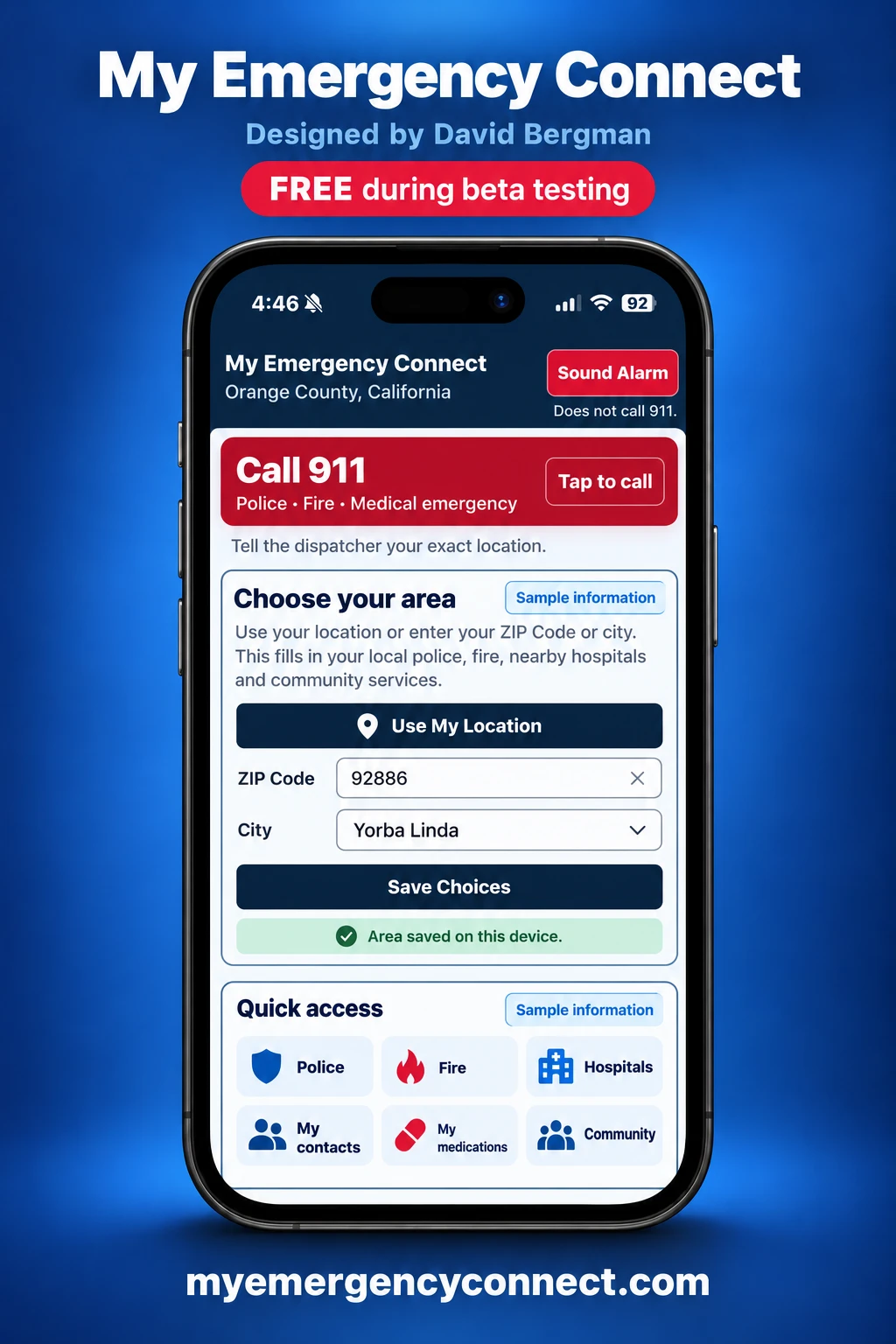
App Home screen with pinned Call 911, personal alarm, area selection and Quick access icons

Home screen · Example information

One tap to callYour phone handles the call
Directions when you need themHospitals and schools
Your details stay with youSaved in your browser on your device

TAKE A LOOK INSIDE

A closer look at the app.

Preview a few of the app’s many features. These illustrations use fictional contacts, places and medication information.

Home and area selection screen

HELP GROW HOME SERVICES

Know a great local professional?

Recommend someone you trust or submit your business. Independent tradespeople and small businesses are welcome. Every proposed listing is reviewed for at least 4.5 stars and 10 reviews on the same Google or Yelp listing, plus service coverage.

Recommend a professional Submit your business

Email submissions are coming soon. Prepare and download a draft now; the submissions mailbox is not active yet.

In the app, “Search more local professionals” opens trade searches on Google Maps using your city or ZIP code. Those external search results have not been checked for inclusion in our directory.

MADE FOR EVERYDAY USE, TOO

Useful before you ever need an emergency number.

HOME SERVICES

Find local help near your ZIP code.

Browse available categories for plumbing, electrical, gardening, appliance repair and other household needs. Up to five qualifying businesses per category, with businesses based in your ZIP first. Listings require at least 4.5 stars and 10 reviews on the same Google or Yelp listing.

Home Services is expanding, starting with Yorba Linda ZIP codes 92886 and 92887. The directory now has seven businesses across seven categories for Yorba Linda; categories awaiting confirmed listings stay out of the menu. Coverage elsewhere varies. Each listing includes a phone number, rating, review count, source link and snapshot date. Ratings come from Google listings or Google review widgets on business websites and are not updated live.

LOCAL PRIORITY

Support businesses close to home.

Small businesses and independent tradespeople qualify equally. Within each location group, results are ordered by rating, then review count. Providers based elsewhere are clearly labeled when their published service area covers your selected city.

LOCAL DIRECTORY

Find the right contact.

Police, fire, hospitals, public schools and colleges, school districts, crisis support, utilities, water, trash, animal services, and more. Choose your area to see local listings.

PERSONAL INFORMATION

Keep important details handy.

Save two emergency contacts, contact details for three doctors, medications, schedules and allergies. Search medication names, edit your list, and print or share a branded PDF with your doctor.

BACKUP & RESTORE

Keep a copy of your information.

In Settings, save a backup of your saved emergency contacts, doctors, medications, allergies, area and school choices to Files or iCloud Drive. Choose that file to restore your information later. Save edits before backing up; backups are manual and contain private information, so keep the file secure.

QUICK ACCESS

Reach help without scrolling.

A single Call 911 button stays near the top on every screen. A separate personal alarm plays a siren to attract attention; it does not call 911 or send an alert.
HELP SHAPE THE APP

Free to try.
Your feedback matters.

We’re initially releasing My Emergency Connect only in Orange County, California, for beta testing. Starting locally lets us check the directory, improve usability, and learn from residents’ feedback before expanding. We have plans to make the app available nationwide.

During beta testing, you can use the app and add it to your phone free, without a payment or access code.

Get started in a minute.

  1. Use the button at the top of this page.
  2. Choose your city or enter your ZIP code.
  3. Explore the directory, contacts and medication list.
Add it to your iPhone

Open the app in Safari, tap Share, then choose Add to Home Screen. Tap Add to place the icon on your phone.

A PERSONAL PROJECT FOR OUR COMMUNITY

Created by David Bergman.

“As an Orange County resident, I wanted to build something practical—a simpler way to find useful local numbers and keep important personal information handy. Thank you for helping me make it better.”